Page templates
The page types the hub builds from: the book page, the docs page, the article and the error page, each assembled from its parts.
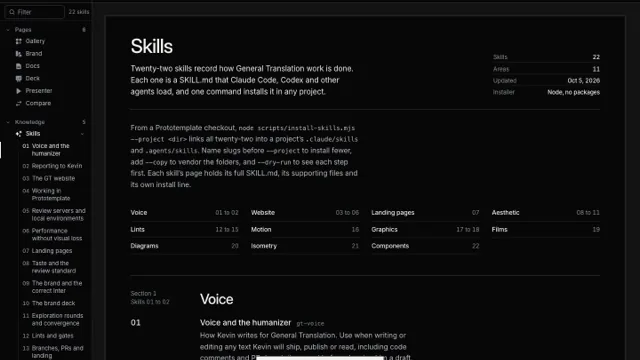
The hub builds its pages from four types. A book page is a hub route inside the viewer shell, a docs page is the layout you are reading, an article is a post on the production mirror's blog, and the error page is the mirror's 404 page. Each plate frames a live page of one type. Anatomy outlines every part, draws its spacing as a hatched band, and labels the part with its spacing token and the value the page computes at the frame's width.
Book page
Every hub page with a book head has one structure, set by DESIGN.md section 4 and held by pnpm lint:heads. Page picks a route built on it, and the labels change with Width because the tokens step down under 900 pixels.
| Part | Component | File | Spacing token |
|---|---|---|---|
| Sidebar | Sidebar | src/components/viewer/Sidebar.tsx | --pt-sb-w, 208px |
| Toolbar | Toolbar | src/components/viewer/Toolbar.tsx | --pt-bar-h, 52px |
| Title | BookHead | src/components/viewer/BookView.tsx | --pt-title-clear, 44px and 24px under 900px |
| Lead | BookHead | src/components/viewer/BookView.tsx | --pt-head-gap, 14px |
| Panel | BookHead | src/components/viewer/BookView.tsx | --pt-head-col-gap, 56px, in a --pt-head-panel column of 304px |
| Mast rule | BookHead | src/components/viewer/BookView.css | --pt-head-rule-pad, 26px |
| Contents | the route's nav.pt-book-toc | src/components/viewer/BookView.css | --pt-book-gap, 32px and 24px under 900px |
| Hatch band | BookHead | src/components/viewer/BookView.css | --pt-sec-over, 48px and 40px under 900px |
| Divider | the route's .pt-book-sec | src/components/viewer/BookView.css | --pt-sec-pad, 30px |
| Gutter note | the divider's small | src/components/viewer/BookView.css | --pt-gutter, 128px, with a --pt-gutter-gap of 28px |
Under 880 pixels of head width the panel stacks under the lead, and under 900 pixels the gutter note moves above the section title, so the plate leaves the panel's gap and the gutter out of the phone frame. The sidebar folds into an overlay at the phone width.
Docs page
The docs site runs fumadocs' notebook layout, the one generaltranslation.com runs at /docs, and docs.css puts its parts on the hub's type steps. Page picks a page with prose and one from the handbook.
| Part | Component | File | Spacing token |
|---|---|---|---|
| Sidebar | DocsLayout with DocsNameplate and DocsSidebarFooter | src/app/docs/layout.tsx | --fd-sidebar-width, 268px |
| Header | DocsLayout | src/app/docs/layout.tsx | --fd-header-height, 56px |
| Page | DocsPage | src/app/docs/[[...slug]]/page.tsx | padding-top from fumadocs' py-6 md:pt-8 xl:pt-14: 24px, 32px from 768px and 56px from 1280px |
| Title | DocsTitle | src/app/docs/[[...slug]]/page.tsx | the page column's gap-4, 16px |
| Lead | DocsDescription | src/app/docs/docs.css | --pt-measure-lead, 30em |
| Meta row | .docs-meta with DocsPageActions | src/app/docs/docs.css | padding-bottom, 16px |
| Body | DocsBody | src/app/docs/docs.css | --pt-measure, 32em, on paragraphs, lists and quotes |
| Contents | fumadocs' table of contents | src/app/docs/layout.tsx | --fd-toc-width, 268px |
Under 1280 pixels the contents move into a bar over the page, and under 768 pixels the sidebar moves into the header's menu. Tables, code and plates keep the full column, and only running text holds to the measure.
Article
A post on the production mirror's blog renders the shipped article page section for section: the nav, the header with its back rail, its copy and its cover, the contents and share rail beside the prose, and the footer. Page picks a post or a release, whose rail also carries its tags.
| Part | Component | File | Spacing token |
|---|---|---|---|
| Nav | ProdNav | src/app/d/production/sections/ProdNav.tsx | height: 56px and a 1px rule |
| Rail | the route's main.tc-rail | src/app/d/production/blog/[slug]/page.tsx | --tc-rail, 1104px |
| Header | BlogArticle | src/app/d/production/sections/BlogArticle.tsx | padding-top: clamp(48px, 6vw, 76px) |
| Back rail | BlogArticle | src/app/d/production/sections/BlogArticle.tsx | a 220px column, column-gap: clamp(28px, 4vw, 56px) |
| Cover | BlogArticleCover | src/app/d/production/sections/BlogArticleCover.tsx | margin-top: 22px |
| Sidebar | BlogArticleSidebar | src/app/d/production/sections/BlogArticleSidebar.tsx | sticky at top: 76px |
| Body | BlogPostBody | src/app/d/production/sections/BlogPostBody.tsx | padding-top: 30px |
| Footer | BlogArticleFooter | src/app/d/production/sections/BlogArticleFooter.tsx | padding: clamp(40px, 5vw, 64px) |
The mirror ports the shipped article's stylesheet rule for rule into blog-article.css, and that sheet writes its spacing as pixel values and clamp() ranges, so the table gives the declaration. The footer sits under the body, so scroll the frame to bring it into view. Under 981 pixels the contents and share rail becomes a bar pinned under the nav. At 390 pixels the rail fills the width, so the plate labels the rail, the back rail and the sidebar at 1440 only.
Error page
An address the production mirror does not hold renders the shipped 404 page and answers with HTTP status 404: the nav, one band with the horizon, the apology inside its hole, the two exits, the code in the corner, and the site footer.
| Part | Component | File | Spacing token |
|---|---|---|---|
| Nav | ProdNav | src/app/d/production/sections/ProdNav.tsx | height: 56px and a 1px rule |
| Band | NotFound | src/app/d/production/sections/not-found.css | min-height: clamp(560px, calc(100svh - 58px), 920px) |
| Horizon | NotFoundHorizon | src/app/d/production/sections/NotFoundHorizon.tsx | --pnf-hole-radius, placed at --pnf-hole-x and --pnf-hole-y |
| Copy | NotFound | src/app/d/production/sections/NotFound.tsx | width: min(calc(var(--pnf-hole-radius) * 1.55), calc(100% - 40px)) |
| Exits | NotFound | src/app/d/production/sections/NotFound.tsx | margin-top: 28px |
| Code | NotFound | src/app/d/production/sections/not-found.css | right: 24px and bottom: 18px |
| Footer | ProdFooter | src/app/d/production/sections/ProdFooter.tsx | --tc-rail, 1104px |
The horizon computes the hole's center and radius from the band's width and height in NotFoundHorizon.tsx and sets them as --pnf-hole-x, --pnf-hole-y and --pnf-hole-radius, and the copy is placed on that center. The overlay reads the same three properties and draws the hole as a circle. The footer fills the width at 390 pixels, so the plate labels it at 1440 only.
Frames
Each plate keeps one live page, created when the plate comes within 180 pixels of the viewport and removed when it leaves, as the page gallery does. The overlay reads the framed document directly, because the frame is same-origin. It measures the parts on load, on every scroll inside the page and on every resize, and it never takes a pointer, so the page under it stays live.